Plans, hours & billing
Track your translation hours, upgrade or cancel, and pay securely.
Steps
- 1
Check your remaining hours
Open the extension popup — the translation hours left in your current period show right at the top, along with your current plan name. The quota resets at the start of each billing period.
You will see: a progress bar of hours used out of your plan total.

- 2
Upgrade or switch plans
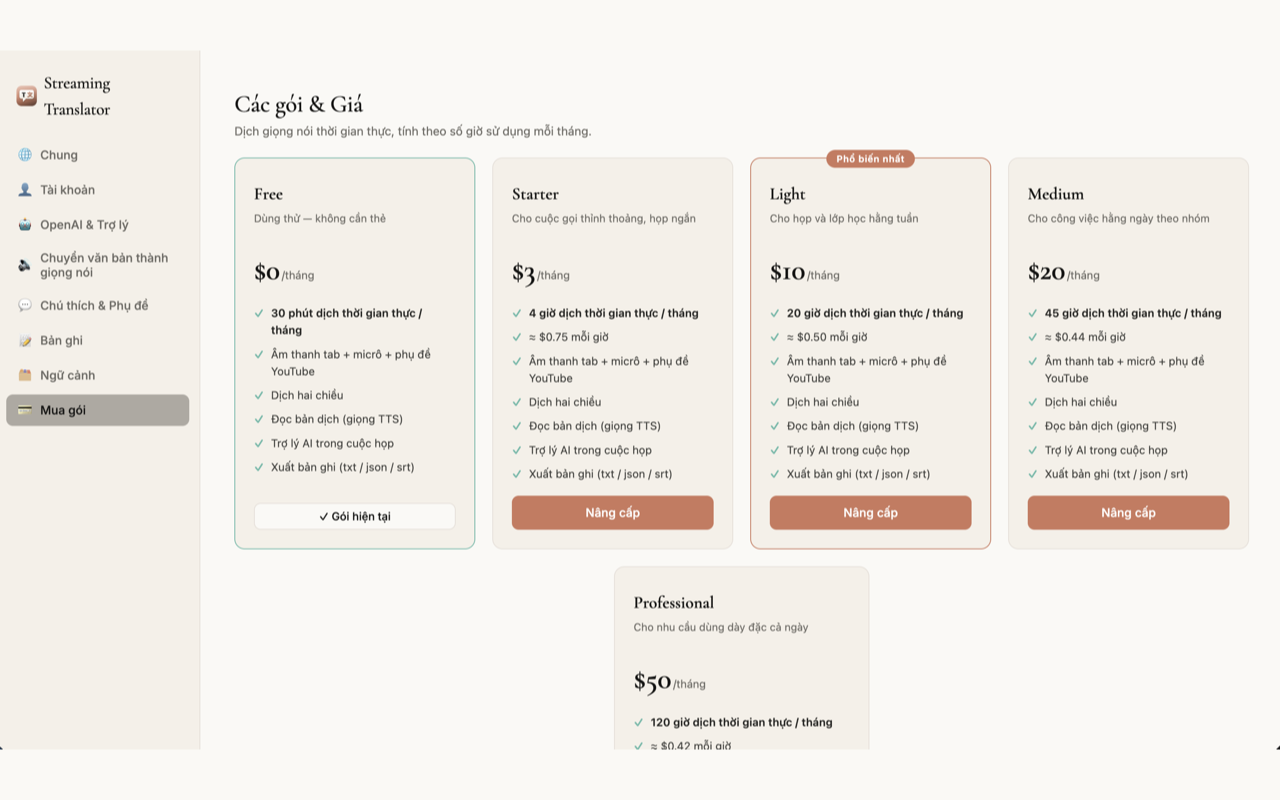
Choose "Upgrade" in the popup, or open the Pricing page. Pick the plan that matches the hours you need — the new quota applies right after payment.
You will see: a comparison table of plans with monthly hours and price.
- 3
Pay securely & cancel any time
Payments are processed through Polar.sh — we never see your card details. Cancel any time; you keep your full remaining hours until the end of the period you paid for.
You will see: the Polar checkout page with international card payment methods.


1 / 3